Страница 1 из 1
XP-406 Ошибка принтера
| Сообщение #1 Отправлено 19 октября 2013 - 21:49

 Оффлайн
 Инфо (3)
Всем привет, Проблема с EPSON XP-406 на мониторе принтера выдает "ошибка принтера.выключите и снова включите устройство", проверка счечика памперса показывает что он не переполнен, на панели моргает POWER с WiFi одновременно, принтер как говорится молчит и не жужит даже, кто в курсе что сним подскажите что делать?
| Сообщение #2 Отправлено 20 октября 2013 - 07:05

вверху форума есть прога принтхелп, скачай и посмотри ошибку на которую ругается принтер.
| Сообщение #3 Отправлено 20 октября 2013 - 09:00
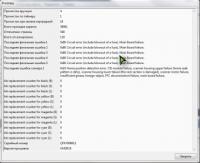
Прочисток вручную 4
Прочисток по таймеру 1
Прочисток при замене картриджей 18
Всего проходов каретки 38061
Отпечатано страниц 548
Всего отсканировано 119
Последняя фатальная ошибка 1 0x80 Circuit error (include blowout of a fuse). Main Board failure.
Последняя фатальная ошибка 2 0x80 Circuit error (include blowout of a fuse). Main Board failure.
Последняя фатальная ошибка 3 0x80 Circuit error (include blowout of a fuse). Main Board failure.
Последняя фатальная ошибка 4 0x80 Circuit error (include blowout of a fuse). Main Board failure.
Последняя фатальная ошибка 5 0x80 Circuit error (include blowout of a fuse). Main Board failure.
Последняя ошибка сканера 1 0x10 Home position detection error. CIS module failure, scanner housing upper failure (home seek pattern is dirty), scanner housing lower failure (the rack section is damaged), scanner motor failure, insufficient grease, foreign object, FFC disconnection/failure, main board failure.
Ink replacement counter for black (B) 0
Ink replacement counter for black (S) 0
Ink replacement counter for black (L) 0
Ink replacement counter for yellow (B) 0
Ink replacement counter for yellow (S) 0
Ink replacement counter for yellow (L) 0
Ink replacement counter for magenta (B) 0
Ink replacement counter for magenta (S) 0
Ink replacement counter for magenta (L) 0
Ink replacement counter for cyan (B) 0
Ink replacement counter for cyan (S) 0
Ink replacement counter for cyan (L) 0
Серийный номер QFKY006012
Версия прошивки UM28C8
| Сообщение #5 Отправлено 21 октября 2013 - 19:26

материнку смени. просит принтер
ну и головку за одно тоже . не зря предохранитель пыхнул.
ну и головку за одно тоже . не зря предохранитель пыхнул.
| Сообщение #6 Отправлено 13 мая 2014 - 09:48

Подскажите что означают мои описания состояния принтера, который все время пишет: ошибка принтераЮ выключите и снова включите устройство.
Manual cleaning counter 60
Timer cleaning counter 3
I/C cleaning counter 90
Total print pass counter 529582
Total print page counter 3490
Total print scan counter 360
Last printer fatal error code 1 0x80 Circuit error (include blowout of a fuse). Main Board failure.
Last printer fatal error code 2 0x80 Circuit error (include blowout of a fuse). Main Board failure.
Last printer fatal error code 3 0x80 Circuit error (include blowout of a fuse). Main Board failure.
Last printer fatal error code 4 0x80 Circuit error (include blowout of a fuse). Main Board failure.
Last printer fatal error code 5 0x80 Circuit error (include blowout of a fuse). Main Board failure.
Last scanner fatal error code 1 0x10 Home position detection error. CIS module failure, scanner housing upper failure (home seek pattern is dirty), scanner housing lower failure (the rack section is damaged), scanner motor failure, insufficient grease, foreign object, FFC disconnection/failure, main board failure.
Ink replacement counter for black (B) 1
Ink replacement counter for black (S) 0
Ink replacement counter for black (L) 0
Ink replacement counter for yellow (B) 1
Ink replacement counter for yellow (S) 0
Ink replacement counter for yellow (L) 0
Ink replacement counter for magenta (B) 1
Ink replacement counter for magenta (S) 0
Ink replacement counter for magenta (L) 0
Ink replacement counter for cyan (B) 1
Ink replacement counter for cyan (S) 0
Ink replacement counter for cyan (L) 0
Серийный номер QFKY007500
Firmware version UM18D4
Manual cleaning counter 60
Timer cleaning counter 3
I/C cleaning counter 90
Total print pass counter 529582
Total print page counter 3490
Total print scan counter 360
Last printer fatal error code 1 0x80 Circuit error (include blowout of a fuse). Main Board failure.
Last printer fatal error code 2 0x80 Circuit error (include blowout of a fuse). Main Board failure.
Last printer fatal error code 3 0x80 Circuit error (include blowout of a fuse). Main Board failure.
Last printer fatal error code 4 0x80 Circuit error (include blowout of a fuse). Main Board failure.
Last printer fatal error code 5 0x80 Circuit error (include blowout of a fuse). Main Board failure.
Last scanner fatal error code 1 0x10 Home position detection error. CIS module failure, scanner housing upper failure (home seek pattern is dirty), scanner housing lower failure (the rack section is damaged), scanner motor failure, insufficient grease, foreign object, FFC disconnection/failure, main board failure.
Ink replacement counter for black (B) 1
Ink replacement counter for black (S) 0
Ink replacement counter for black (L) 0
Ink replacement counter for yellow (B) 1
Ink replacement counter for yellow (S) 0
Ink replacement counter for yellow (L) 0
Ink replacement counter for magenta (B) 1
Ink replacement counter for magenta (S) 0
Ink replacement counter for magenta (L) 0
Ink replacement counter for cyan (B) 1
Ink replacement counter for cyan (S) 0
Ink replacement counter for cyan (L) 0
Серийный номер QFKY007500
Firmware version UM18D4
| Сообщение #7 Отправлено 13 мая 2014 - 10:02

 retro_a сказал:
Main Board failure.
Отказ главной управляющей платы.
| Сообщение #8 Отправлено 26 октября 2014 - 10:18

Подскажите, что означают мои описания состояния принтера, который все время пишет: ошибка принтера, выключите и снова включите устройство.
Manual cleaning counter 30
Timer cleaning counter 3
I/C cleaning counter 15
Total print pass counter 44514
Total print page counter 996
Total print scan counter 63
Last printer fatal error code 1 0x89 Insufficient light error. Sensor failure (PIS board installation failure, contaminated sensor), abnormal sensor output (break of FFC during printer operation, PIS board failure), unable to accurately detect where the fault detection plate is because too much diffused light from outside is shed on the sensor (when used outdoors or near the window where direct sunlight comes in), ink cartridge failure (contaminated/damaged prism).
Last printer fatal error code 2 0x89 Insufficient light error. Sensor failure (PIS board installation failure, contaminated sensor), abnormal sensor output (break of FFC during printer operation, PIS board failure), unable to accurately detect where the fault detection plate is because too much diffused light from outside is shed on the sensor (when used outdoors or near the window where direct sunlight comes in), ink cartridge failure (contaminated/damaged prism).
Last printer fatal error code 3 0x89 Insufficient light error. Sensor failure (PIS board installation failure, contaminated sensor), abnormal sensor output (break of FFC during printer operation, PIS board failure), unable to accurately detect where the fault detection plate is because too much diffused light from outside is shed on the sensor (when used outdoors or near the window where direct sunlight comes in), ink cartridge failure (contaminated/damaged prism).
Last printer fatal error code 4 0x89 Insufficient light error. Sensor failure (PIS board installation failure, contaminated sensor), abnormal sensor output (break of FFC during printer operation, PIS board failure), unable to accurately detect where the fault detection plate is because too much diffused light from outside is shed on the sensor (when used outdoors or near the window where direct sunlight comes in), ink cartridge failure (contaminated/damaged prism).
Last printer fatal error code 5 0x89 Insufficient light error. Sensor failure (PIS board installation failure, contaminated sensor), abnormal sensor output (break of FFC during printer operation, PIS board failure), unable to accurately detect where the fault detection plate is because too much diffused light from outside is shed on the sensor (when used outdoors or near the window where direct sunlight comes in), ink cartridge failure (contaminated/damaged prism).
Last scanner fatal error code 1 0x00 Fatal error does not occur.
Ink replacement counter for black (B) 0
Ink replacement counter for black (S) 1
Ink replacement counter for black (L) 0
Ink replacement counter for yellow (B) 0
Ink replacement counter for yellow (S) 1
Ink replacement counter for yellow (L) 0
Ink replacement counter for magenta (B) 0
Ink replacement counter for magenta (S) 1
Ink replacement counter for magenta (L) 0
Ink replacement counter for cyan (B) 0
Ink replacement counter for cyan (S) 1
Ink replacement counter for cyan (L) 0
Серийный номер QFKY005867
Firmware version UM28C8
Manual cleaning counter 30
Timer cleaning counter 3
I/C cleaning counter 15
Total print pass counter 44514
Total print page counter 996
Total print scan counter 63
Last printer fatal error code 1 0x89 Insufficient light error. Sensor failure (PIS board installation failure, contaminated sensor), abnormal sensor output (break of FFC during printer operation, PIS board failure), unable to accurately detect where the fault detection plate is because too much diffused light from outside is shed on the sensor (when used outdoors or near the window where direct sunlight comes in), ink cartridge failure (contaminated/damaged prism).
Last printer fatal error code 2 0x89 Insufficient light error. Sensor failure (PIS board installation failure, contaminated sensor), abnormal sensor output (break of FFC during printer operation, PIS board failure), unable to accurately detect where the fault detection plate is because too much diffused light from outside is shed on the sensor (when used outdoors or near the window where direct sunlight comes in), ink cartridge failure (contaminated/damaged prism).
Last printer fatal error code 3 0x89 Insufficient light error. Sensor failure (PIS board installation failure, contaminated sensor), abnormal sensor output (break of FFC during printer operation, PIS board failure), unable to accurately detect where the fault detection plate is because too much diffused light from outside is shed on the sensor (when used outdoors or near the window where direct sunlight comes in), ink cartridge failure (contaminated/damaged prism).
Last printer fatal error code 4 0x89 Insufficient light error. Sensor failure (PIS board installation failure, contaminated sensor), abnormal sensor output (break of FFC during printer operation, PIS board failure), unable to accurately detect where the fault detection plate is because too much diffused light from outside is shed on the sensor (when used outdoors or near the window where direct sunlight comes in), ink cartridge failure (contaminated/damaged prism).
Last printer fatal error code 5 0x89 Insufficient light error. Sensor failure (PIS board installation failure, contaminated sensor), abnormal sensor output (break of FFC during printer operation, PIS board failure), unable to accurately detect where the fault detection plate is because too much diffused light from outside is shed on the sensor (when used outdoors or near the window where direct sunlight comes in), ink cartridge failure (contaminated/damaged prism).
Last scanner fatal error code 1 0x00 Fatal error does not occur.
Ink replacement counter for black (B) 0
Ink replacement counter for black (S) 1
Ink replacement counter for black (L) 0
Ink replacement counter for yellow (B) 0
Ink replacement counter for yellow (S) 1
Ink replacement counter for yellow (L) 0
Ink replacement counter for magenta (B) 0
Ink replacement counter for magenta (S) 1
Ink replacement counter for magenta (L) 0
Ink replacement counter for cyan (B) 0
Ink replacement counter for cyan (S) 1
Ink replacement counter for cyan (L) 0
Серийный номер QFKY005867
Firmware version UM28C8
| Сообщение #9 Отправлено 26 октября 2014 - 10:28

Народ, ну вы вот находите с помощью поиска этот форум. А что на большее головы не хватает? Реально уже за...ли.
ПЕРВАЯ ССЫЛКА В ЯНДЕКСЕ
Правда это так сложно?
ПЕРВАЯ ССЫЛКА В ЯНДЕКСЕ
Правда это так сложно?
| Сообщение #10 Отправлено 26 октября 2014 - 10:38

serg0000, эта ошибка означает в переводе :
Последнее принтер код фатальная ошибка 2 0x89 вашем ошибка свет. Неисправность датчика (НЦБ отказ установка доска, загрязненные датчик), ненормальное выход датчика (разрыв ФФС во время работы принтера, отказ доска НЦБ), не в состоянии точно определить, где пластина обнаружения неисправности из-за слишком рассеянный свет извне проливается на датчике (при использовании на открытом воздухе или возле окна, где прямые солнечные лучи приходит в), отказ картриджей с чернилами (загрязненные / поврежденный призму).
Надо смотреть ... Гм .... Фото датчик определения окончания чернил в картридже .
Он находиться на металической пластилине .
Последнее принтер код фатальная ошибка 2 0x89 вашем ошибка свет. Неисправность датчика (НЦБ отказ установка доска, загрязненные датчик), ненормальное выход датчика (разрыв ФФС во время работы принтера, отказ доска НЦБ), не в состоянии точно определить, где пластина обнаружения неисправности из-за слишком рассеянный свет извне проливается на датчике (при использовании на открытом воздухе или возле окна, где прямые солнечные лучи приходит в), отказ картриджей с чернилами (загрязненные / поврежденный призму).
Надо смотреть ... Гм .... Фото датчик определения окончания чернил в картридже .
Он находиться на металической пластилине .
Будущее теперь наше и оно начинается СЕЙЧАС!
R3000 . 3880 . 7900 . 9890 . ipf6400 . ipf605 . bizhub C552 . bizhub pro C6500 .
R3000 . 3880 . 7900 . 9890 . ipf6400 . ipf605 . bizhub C552 . bizhub pro C6500 .
| Сообщение #12 Отправлено 26 октября 2014 - 10:48

- Administrator
-

 Онлайн
http://reseters.ru/...showtopic=36974
Если СНПЧ капсульная - заклейте отверстия с оптопарами.
По ссылке - подробно.
Если СНПЧ капсульная - заклейте отверстия с оптопарами.
По ссылке - подробно.
Все ответы здесь-> : FAQ по Epson, FAQ по Canon , FAQ по СНПЧ, принтерам, чернилам , Ликбез , Рубрикатор Форума
Важно: Пользуемся Поиском по Форуму , не нашли - спросите сами -> Как задать вопрос, чтобы получить на него ответ
ОТЗЫВЫ наших покупателей о продукции RESETTERS-SuperPrint
Важно: Пользуемся Поиском по Форуму , не нашли - спросите сами -> Как задать вопрос, чтобы получить на него ответ
ОТЗЫВЫ наших покупателей о продукции RESETTERS-SuperPrint