
 Оффлайн
 Инфо (27)
Ищу Service Manual для принтера Canon ipf710, у кого есть огромная просьба поделитесь: printera0@gmail.com
Как правильно промывать весь тракт при смене типа пигментных чернил?
Какие особенности при промывке головы? Как ее при этом снять и правильно поставить обратно?
Страница 1 из 1
IPF710 - все про сервисное обслуживание материалы касающиеся текущего обслуживания принтера
| Сообщение #2 Отправлено 29 апреля 2010 - 17:48
Удалось купить в нете service manual ipf 700 series ipf710, кому нужно пишите printerA0@gmail.com поделюсь, за пару баксов :)
| Сообщение #3 Отправлено 04 октября 2010 - 11:51
6.1.1 Service Mode Operation
0013-7777 a) How to enter the Service mode
Enter the Service mode following the procedure below.
1) Turn off the printer.
2) Turn on the printer while holding down the [Paper Source] button and [Information] button.
* Keep pressing the above buttons until "Initializing" appears on the display.
3) "S" is displayed in the upper right corner of the display showing the version.
4) After display of "Online", pressing the [Menu] button displays the SERVICE MODE top menu and the MESSAGE LED flashes.
* The Service mode is added to the options in the Main menu. The Service mode can be entered even in the error status (when an error message is shown on the
display) by turning the power off and then using the above key operation.
b) How to exit the Service mode
Turn off the printer.
c) Key operation in the service mode
- Selecting menus and parameters: [< ] or [> ] button
- Going to the next lower-level menu: [ ^] button
- Going to the next higher-level menu: [ ] key
- Determining a selected menu or parameter: [OK] button
0013-7777 a) How to enter the Service mode
Enter the Service mode following the procedure below.
1) Turn off the printer.
2) Turn on the printer while holding down the [Paper Source] button and [Information] button.
* Keep pressing the above buttons until "Initializing" appears on the display.
3) "S" is displayed in the upper right corner of the display showing the version.
4) After display of "Online", pressing the [Menu] button displays the SERVICE MODE top menu and the MESSAGE LED flashes.
* The Service mode is added to the options in the Main menu. The Service mode can be entered even in the error status (when an error message is shown on the
display) by turning the power off and then using the above key operation.
b) How to exit the Service mode
Turn off the printer.
c) Key operation in the service mode
- Selecting menus and parameters: [< ] or [> ] button
- Going to the next lower-level menu: [ ^] button
- Going to the next higher-level menu: [ ] key
- Determining a selected menu or parameter: [OK] button
| Сообщение #4 Отправлено 24 марта 2011 - 08:51

- Administrator
-

Вход в сервисный режим:
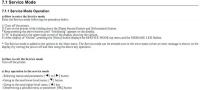
Сброс уровня чернил в картриджах:
Clear [COUNTER] > [INK-USE2]
дойти до [COUNTER] > [CLEAR] > [CLR-INK CONSUME]
Сброс уровня чернил в картриджах:
Clear [COUNTER] > [INK-USE2]
дойти до [COUNTER] > [CLEAR] > [CLR-INK CONSUME]
Все ответы здесь-> : FAQ по Epson, FAQ по Canon , FAQ по СНПЧ, принтерам, чернилам , Ликбез , Рубрикатор Форума
Важно: Пользуемся Поиском по Форуму , не нашли - спросите сами -> Как задать вопрос, чтобы получить на него ответ
ОТЗЫВЫ наших покупателей о продукции RESETTERS-SuperPrint
Важно: Пользуемся Поиском по Форуму , не нашли - спросите сами -> Как задать вопрос, чтобы получить на него ответ
ОТЗЫВЫ наших покупателей о продукции RESETTERS-SuperPrint